Showing posts with label Cricut Cartridges. Show all posts

Monday, March 31, 2014

Last Birthday for March


Today is the last day of my birthday cards series.  I had hoped to post more, but we’ve had so many events in the works that I didn’t have as much time to work on them as I planned.  I did enjoy focusing on one theme for the whole month, though, so I think I’ll continue that for April to see how it goes. 

Don't forget that tomorrow, April 1, is the beginning of The Craft Squad blog hop.  Our theme for April is “Hoppity Hop Hop”, so you can be there will be some really cute Easter projects hop hop hopping your way!  I can’t wait to show you the projects I made.  I did not one, but three Easter cards, and they are just too cute for words!


After I made my three cards, I had some scraps left over, so I made two more cards, one of which I will share with you today as the last birthday card for March.


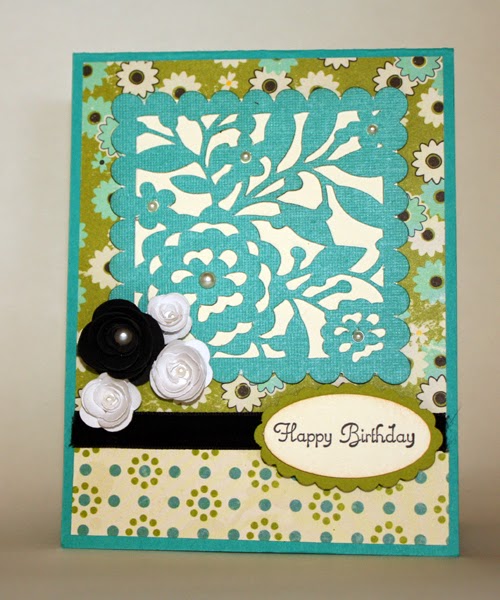
If I could remember where the paper came from, I would tell you, but to be honest, I think it was something that came in a multi-pack I picked up at some scrapbooking sale.  I just loved the color combo and had to have it.  The cardstock is Stampin’ Up Bermuda Bay, Old Olive and Very Vanilla.  I also used the Stampin’ Up oval and scalloped oval punches and the Create a Cupcake stamp set.  The rest of the card was a series of Cricut cuts.  The filigree square was cut using the Cindy Loo cartridge and I backed it with a square of Very Vanilla cardstock.  I used Close to My Heart’s Art Philosophy cartridge to cut the rosettes.

I started with just the black rosette, and then decided that the black was too dark and ominous.  In retrospect, I probably should have used the Very Vanilla again, but I added the white and had them glued down before I realized that there was no other white on the card.  The other cards I did in this series (some of which you will see tomorrow) all had a mixture of both white and vanilla, so I’m okay with the white on this one, but I would do it differently if I had to do it over again.

That’s it for today.  Be sure to stop by tomorrow for the blog hop!

Saturday, June 16, 2012

Time for More LOAD 512!


Time marches on, and at this rate it might be March 2013 before I get all these layouts uploaded.  All kidding aside, here are some more layout samples from the May LOAD.

Day 17:  Cartoon Connection

Lain’s prompt for this day was Cartoon Connection.  As mother to a family of cartoon and anime lovers, I could certainly have gone any number of directions with this prompt, but in the spirit of keeping it simple and getting things done, I opted to work on one of Christen’s dance layouts.  This actually kills two birds with one stone – not only do I get to use up some of those old film photos that have been laying around here for years, but I also get to work on eliminating stuff in the file cabinet where I keep all the documents and memorabilia like dance recital programs.  This particular program was very large and didn’t match my page, so I attached a file tab to the top and it will slide behind the page when I put it in the book.

The page itself is a very simple one.  Since the theme of the recital was Disney, I went with the Disney Castle and used “Once Upon a Time” as my title.  The title is actually a die cut from the Cricut cartridge “Storybook”.  The journaling medallion was die cut using my Big Shot and Stampin’ Up!’s nesting dies after I printed onto the cardstock with my printer.  The castle came from the Cricut cartridge “Life is a Beach”.  The paper came from a Die Cuts with a View paper stack called, of course, “Once Upon a Time”.


Day 18:  Smell

This Five Senses Friday prompt had me stumped for a while.  There are lots of smells I could scrapbook, but I really didn’t have pictures or paper for any of them, and one of the main reasons I did LOAD was to knock down the piles of photos, paper, and embellishments that are cluttering up my workspace.  So after a lot of thought, I settled on the smell of burning rubber.  This is a really simple page with no elaborate embellishments or techniques.  I like it that way.  I know a lot of scrapbookers who scrapbooked all their albums chronologically and who now look back on their early work with disdain because the pages are plain and simple.  The more techniques we learn, the more likely we are to clutter up our pages with them.  Don’t get me wrong, as you can tell from some of my layouts, I like a lot of glitter and bling as much as anyone, but sometimes layouts need to be simple, and there is nothing wrong with that.  One of the reasons I love scrapbooking my albums out of order is because styles and techniques change.  I like a mixture in my books and I don’t want to flip through it years from now and dislike what I see.


Day 19:  Pete/Repeat

Pete and Repeat were in a boat.  Pete fell out.  Who was left?  Repeat.  Pete and Repeat were in a boat.  Pete fell out…. It’s a silly joke that kids love, and it was also our theme for Day 19.  On this day, Lain challenged us to use something from the previous layout again.  Some suggestions included: use a photo over again, use scrap paper to make embellishments, use the same title, design, or color scheme, or even scrap the same subject from a different angle.

Didn’t I just do a blog about that?  Oh yeah…it was this one from the February LOAD:


For this layout, I actually repeated several elements of my previous page. Not only did I repeat the strip of cardstock on the right hand side, but I also used a round embellishment as an accent on the title. The color scheme is also a variation of the muted pink, yellow and green that was used on the previous page. Even though the subject matter is not a repeat, they did both occur in the same year.


Tip of the day:

Do you own a Cricut?  Are you tired of thumbing through all the books looking for just the right embellishment?  Are you frustrated when you search for images on your Gypsy?  Do you wish there was a simpler way to find a specific die cut you are looking for?  Well there is!  MyCutSearch.com is a great search engine for locating Cricut designs. Here’s what the website has to say:

MyCutSearch.com will save you time when working on your scrapbooking, card making or paper crafts.  You will no longer have to flip through all of your Cricut handbooks or cheat sheets to find the perfect image to complete your crafting project.  Just type it into the search box and we will show you all of the choices you have.

Make sure to save the link to MyCutSearch.com on your computer.  Next to your scrapbooking paper, paper punches and tape runner, MyCutSearch.com could be your most important scrapbooking and card making tool.  When you think of scrapbooking and card making we hope you think of MyCutSearch.co

I used MyCutSearch.com to locate the castle I used on the Disney recital layout.  I love that I can search ALL cartridges, not just the ones I own.  Using the site has actually helped me decide to purchase a few cartridges I wasn’t sure I wanted.  A search turned up images that I thought I might use, and since Provocraft doesn’t put all the images on the outside box, I would never have known they were on the cartridge if I hadn’t used the search.  I also like that the website displays the images exactly as they appear on the font’s handbook – way better than the terrible drawings that pop up on my Gypsy.

Oh, one last thing….don’t forget to check our online calendar for upcoming events!  We have a lot of great scrapbooking opportunities coming up over the next couple of months.  You don’t want to miss it!


Sunday, June 19, 2011

Where's the Fonts?


How many of you remember the old Wendy’s commercial “Where’s the Beef?” where the little old lady goes to the burger joint and winds up with a big fluffy bun and not much else? Some days, that’s the way I feel about my Cricut – there’s just no substance to it any more…no meat. It promised to be the next big thing in die cutting letters for titles in my scrapbooks, and I happily gobbled up whatever fonts I could get my hands on. Unfortunately, the answer to all my title problems has instead become a cartoonish collection of silly images and shapes that may look cute, but really aren’t very useful at all.

Don’t get me wrong…I love my Cricut. I own 32 cartridges of some of the cutest fonts, images, shapes, and graphic designs I could ever imagine. I use my Expression all the time and am slowly developing a gentle friendship with my Gypsy handheld. I cut out all kinds of cute shapes and letters for my scrapbooks, cards, posters, even a stencil for a Boy Scout cook box. But let’s face it -- it’s just not the title and letter cutting machine that it was made out to be.

For those of you unfamiliar with the history, the Cricut was first introduced in May of 2006 as an answer to Xyron’s Personal Die Cutting System and the Wishblade. It was marketed primarily to scrapbookers and crafters for cutting lettering and fonts for titles, posters, and journaling. Its main selling point was that it was several hundred dollars cheaper than the Xyron’s Wishblade and it did not require a computer for use. It also boasted a catalog of font and shape cartridges that promised infinite flexibility through adjustable sizing and optional features on each cartridge -- all for about the same price (or less) as a traditional die-cut font set such as the QuicKutz, Sizzix, and Accucut fonts that were popular at the time. The Cricut Personal Electronic Cutter was a smash hit and was soon followed by the Cricut Expression machine, which offered even more flexibility and options, as well as the ability to cut paper in sizes up to 12” x 24.

I got my Expression in 2008 as a birthday gift from my husband, and I immediately spent every bit of extra money I had, including several gift cards, to buy fonts for it. My favorites were the original Plantin Schoolbook, Storybook, Opposites Attract, and (eventually) the Hannah Montana font. What all these cartridges had in common was that they were all font-based cartridges, often with multiple options for different styles of lettering, and while all of them have at least some shapes on them, the images and shapes were not the purpose or main focus of the cartridge. These cartridges are still my go-to cartridges when I need a nice font quick. They represent a nice variety of styles that fit just about any occasion. But still I want more.

Of the 32 cartridges I own, about half of them contain a font of some sort. The others were either gifts (most of them) or were purchased for use on a specific project (Handy Man, 50 States, Destinations, Stand and Salute) and whenever I see that Provo Craft has released new cartridges, the first thing I look for is more fonts. At the time of writing, Provo Craft has released 283 cartridges, which averages to more than 55 new cartridges a year for the past five years. Sadly, other than a few Walmart-exclusive “Lite” cartridges, there has not been a single font cartridge released in almost two years.

So what happened? Why has Provo Craft abandoned the font lovers in favor of sickeningly sweet cuteness in the form of smiling watermelon images, cuddly critters, household objects, and holiday shapes? Why are we now reduced to going back to our traditional die cutting systems for new fonts, or worse yet, investing in a new system altogether? Is it time to revisit the Wishblade or the Silhouette? Many scrapbookers have turned to Craft Edge, the makers of Sure Cuts a Lot, for the answer.

Sure Cuts a Lot (SCAL) is a software program that enables Cricut users to use any TrueType font, SVG (Scalable Vector Graphics) file, or even your own drawing without requiring an additional cartridge purchase[i]. I haven’t used SCAL, but I’m definitely intrigued. I’ve been a collector of fonts since the late ‘80’s, and have used them extensively in my scrapbooks. Until now, the greatest drawback has been that I could only print those fonts. But if I could cut them out of paper, cardstock, or any number of other materials, well, then I would be a very happy camper!

The mere fact that this product exists demonstrates the obvious demand by Cricut users for more flexibility, and especially for fonts. Unfortunately, in response to the rise in sales of the SCAL software, Provo Craft did a really dumb and (at least to me) classless thing. Rather than accept the gauntlet that has been thrown, rising to the challenge and meeting the demands of their users by introduce more fonts and more flexibility, or better yet, by adding TrueType functionality to their existing (and popular) Design Studio software and Gypsy handheld devices, they decided to sue Craft Edge. Filing suit in January 2011, Provo Craft seeks to end distribution of the SCAL software based on alleged violations of their copyright[ii].

The controversial move has outraged many avid SCAL fans and Cricut users, and has been perceived as unjust, juvenile, bordering on the equivalent of siblings in the back seat of the car yelling, “He’s looking at me!” That Provo Craft would take this stance is quite a slap in the face to the thousands of Cricut users who have been begging Provo Craft for these options for years. It is obvious that Provo Craft is not interested in what its customers want or need, and that they are little more than a big bully on the playground insisting that everyone play the game their way.

Provo Craft needs to change their attitude if they expect me to keep buying their products. Start listening to customers. Stop beating up the little guys. Let the customers choose the way they want to play. Put some real meat in your products, not just silly fluff and big buns. That reminds me of another burger slogan, one that Provo Craft should adopt -- Burger King’s “Have it Your Way” campaign. Imagine being able to turn on your Cricut machine and cut out any letter, any shape, in any style or size that you could imagine. Now THAT would be something I could sink my teeth into!


[i] http://en.wikipedia.org/wiki/Cricut

[ii] http://www.scrapbookupdate.com/s=Provo+Craft+Sues+Sure+Cuts+A+Lot&submit=Search

Monday, January 3, 2011

Stickles, Cricut and Walmart -- Oh My!

I can’t believe it’s already a new year!  This past year went by so fast for me, and even though we’ve been really busy, I don’t always feel like I’ve gotten a lot done.  Either way, it’s good to have a fresh start and my vow to myself -- (let’s not call it a resolution because then I might just break it!)…where was I?  Oh yeah, my vow to myself is to let go of things that waste my time.  Efficiency is the key, and so is organization.  I’ve been working on organizing my craft supplies for quite some time.  It’s always a work in progress, but hopefully some day I will hit on the perfect option.

Lately I’ve been using some snap-type food containers that come in a wide variety of sizes.  It works well for most of my stuff, but some supplies have been moved from one box to another so many times that I’m not even sure where they are any more!  For instance, just about the time that I find the perfect container for my collection of Stickles, Ranger comes out with a few more colors that I absolutely must have, and there I am again, looking for a new container! 


This week is no exception.  Christen discovered that Ranger is releasing nine new Stickles colors.  Luckily for me, my current Stickles container has some extra room in it (I thought I’d try to stay ahead of the game this time!), so all I need to do is move my tiny bottles of flocking to a new home and then I’ll have plenty of room to add all the new colors, especially this one:


One of the new colors does not yet have a name.  Ranger is running a contest to pick the name for the new Stickles.  The winner gets new Stickles, of course!  If you are interested, please go to http://blog.rangerink.com/blog/2011/01/nine-new-stickles-colors-and-a-contest.html and place your vote.

I could easily be just as excited about all the new Cricut cartridges, too, if it wasn’t for the fact that I am so frustrated with the selection.  Have you noticed that ProvoCraft hasn’t released many new letter fonts in quite some time?  It seems they have shifted their focus away from lettering and fonts and onto cutesy artwork, graphic designs and, of course, cake decorations.  I don’t know about you, but the whole reason I wanted a Cricut was to cut out fonts -- letters, words, titles, etc.  The zoo animals and robots and fruit and flowers are cute and all, but what I really need is alphabets and numbers!

While I’m grousing about the woefully low number of actual fonts, let me tell you about my recent attempt to buy a Cricut Lite font at Walmart.  I’m not a frequent Walmart shopper.  I used to go there all the time, but the two Walmart stores in my immediate area are filthy, over-crowed, under-staffed, and over-priced on a lot of the items I buy.  Most people automatically assume that they have the lowest price, but this is not necessarily so – they only guarantee that they will match the lowest price.  I have frequently found that many of their prices are actually higher than at other stores on many of the items I buy regularly.  On top of that, after a major store remodel a year or two ago, I found that they no longer carry many of the items I would go in there to buy.  The craft section was cut down to less than a ¼ it’s original size, with no fabric section at all, and the scrapbooking section, which used to take up two full rows, is now relegated to half a row at the front of the store next to the wedding supplies and birthday cards.  So for me, it’s just not worth it to go in there.  Yes, I could get stuff at a low price if I want to sit there and argue with the cashier over the price of every single item, but chances are, they won’t have what I need anyway, so why bother?

There is, however, one thing that would make me go shopping in a Walmart store, and that’s a Walmart-exclusive Cricut Lite cartridge.  I had decided a couple of weeks ago that the Handy Man cartridge was exactly what I needed to finish my son’s Eagle Scout project scrapbook.  All my layouts were done except for some journaling and embellishments.  So when I saw this font, I knew I had to have it.  Unfortunately, it’s a Cricut Lite cartridge, so that means a trip to Walmart. 

I planned my trip out carefully and waited until I needed some additional items to make my trip worthwhile.  Unfortunately, when I got there, the only thing the store had that was on my list was a bell pepper and some cheese!  They were either out of, or didn’t carry, everything else!  I went first to the scrapbook section, thinking I would find a rack with a wide assortment of these Walmart-only Cricut cartridges.  Nope.  They did have four of the new Cricut Expressions in the cute new colors.  They also had one of the older Cricut cartridges that was several years old.  It was still priced at $64.  I think I can buy that same cartridge at CricutMachine.com for $14.99. 

Thinking that these new cartridges must be shelved on a big display somewhere else in the store, I gave my BFF Stephanie a quick call to see if she’d seen them.  She suggested I look back in the craft section because she’d seen them there a few times.  They did have two additional cartridges, hanging right next to the sheets of felt and bags of puffballs (or something completely incongruous like that), but again, they were older cartridges, priced far above what they were worth, and there wasn’t a single Cricut Lite cartridge to be found.  So I bought my cheese and left.

Not wanting to drive all over town hoping that another Walmart might have the cartridge, I decided to go online to Walmart.com and use the site-to-store shipping option.  This would save me a few bucks, and hopefully I could get it here a little quicker by volunteering to come in and pick it up rather than wait for it to be shipped to my house.  Or so you would think.  In actuality, the site-to-store option was actually going to take longer than a UPS delivery to my house, but these so-called “Lite” cartridges really aren’t all that cheap, and I needed to be frugal after the holidays, so I chose the site-to-store method anyway.  It wasn’t until after I had gone through the entire checkout process that a message came up on the website and notified me that site-to-store wasn’t available.  Apparently, not one of the 30 Walmart stores in a 50 mile radius had this item available for site-to-store delivery.

Needless to say, I wound up having the cartridge shipped by UPS and it still hasn’t arrived.  I think next time I’ll just order it from Amazon.com.  They carry the Cricut Lite cartridges, too, and though it may cost a little more, it will be worth it to avoid the hassle of a company I’d rather avoid.  In the mean time, I guess I’ll just have to be satisfied looking at all the pretty new Stickles!